UIDesignMobileDesignComponentDesign

Exploring Bottom Navigation Bar Variations

Exploring Bottom Navigation Bar Variations - Mockup

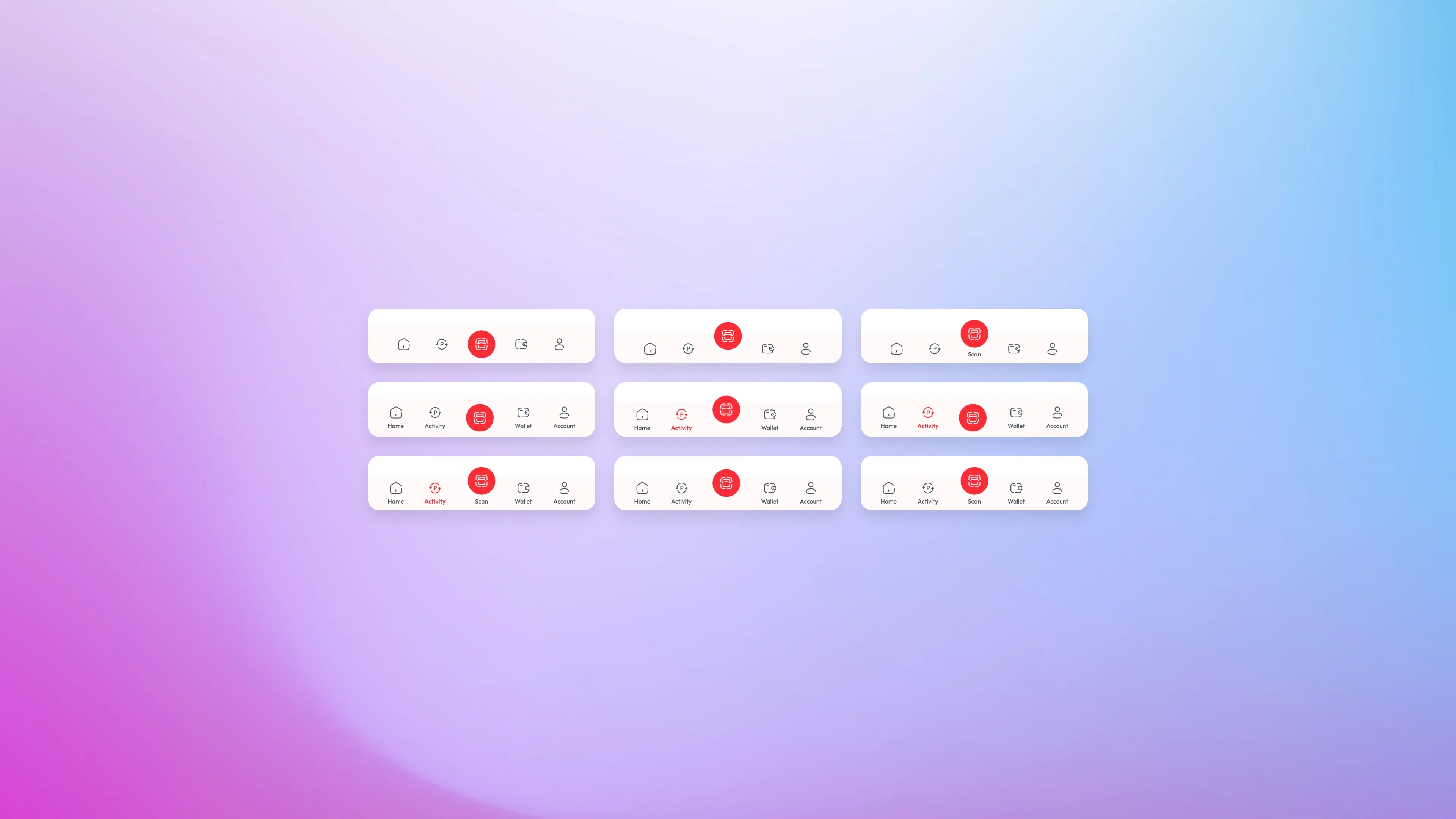
The bottom navigation bar is one of the most used components in any mobile app — yet small decisions in how it's designed can completely change how it feels to use. This project explores multiple visual variations of a bottom nav bar for a fintech-style app, covering icon treatment, label placement, active state styles, and the overall balance between minimalism and usability.

The Design Direction

The concept uses a light, minimal aesthetic with a white card surface and a strong red accent color — a common palette in fintech and payment apps. The navigation items are: Home, Activity, Scan, Wallet, and Account. The Scan action sits at the center and is treated as the primary action — elevated with a filled red circle to distinguish it from the rest. This is a deliberate hierarchy decision: the most-used action in a payment app deserves to stand out without the user having to think about it.

The Problem

Bottom navigation bars are easy to get wrong. Too much visual noise and the bar competes with the main content. Too minimal and users lose track of where they are. The active state — the one element that needs to communicate "you are here" — is often either too subtle to notice or too aggressive that it dominates the whole bar.

Variations Explored

The nine variations in this project each answer a slightly different design question:

01.

Icon only vs. icon with label

does removing labels make the bar feel cleaner, or does it hurt discoverability?

02.

Label on active item only

a middle ground where the bar is minimal by default but reveals context on the active state

03.

Active icon filled vs. outlined

a filled icon feels heavier and more decisive; an outlined icon feels lighter and more refined

04.

Active state with color accent only

using red text or red icon without any background fill, keeping the bar flat and quiet

05.

Active state with pill/background highlight

adding a subtle background behind the active icon to create a contained, card-like active state

Active State Design

The active state is the heart of any navigation component. In this exploration, three main approaches are tested:

01.

Color only

the active item switches to red (icon and/or label), everything else stays gray. Simple, low visual weight.

02.

Bold label

the active label becomes bold and red, making it readable at a glance without changing the icon style

03.

Filled background

a red circle or pill appears behind the active icon, creating a strong focal point that's impossible to miss

Details That Matter

A few intentional design decisions that run across all variations:

01.

Consistent icon weight

all icons use the same stroke weight, so no single item feels heavier than another before the active state kicks in

02.

Scan button always elevated

regardless of the variation, the center Scan button keeps its filled red circle treatment. It's the one element that stays consistent because it's the primary CTA of the entire app

03.

Label capitalization

labels use sentence case with the first letter capitalized, keeping the bar readable without feeling like a formal interface

04.

Spacing and padding

generous horizontal spacing between items prevents the bar from feeling cramped, especially on smaller screens

cahya putra ugira portfolio