UIDesignMobileDesign

Redesigning the Mobile Notification Experience

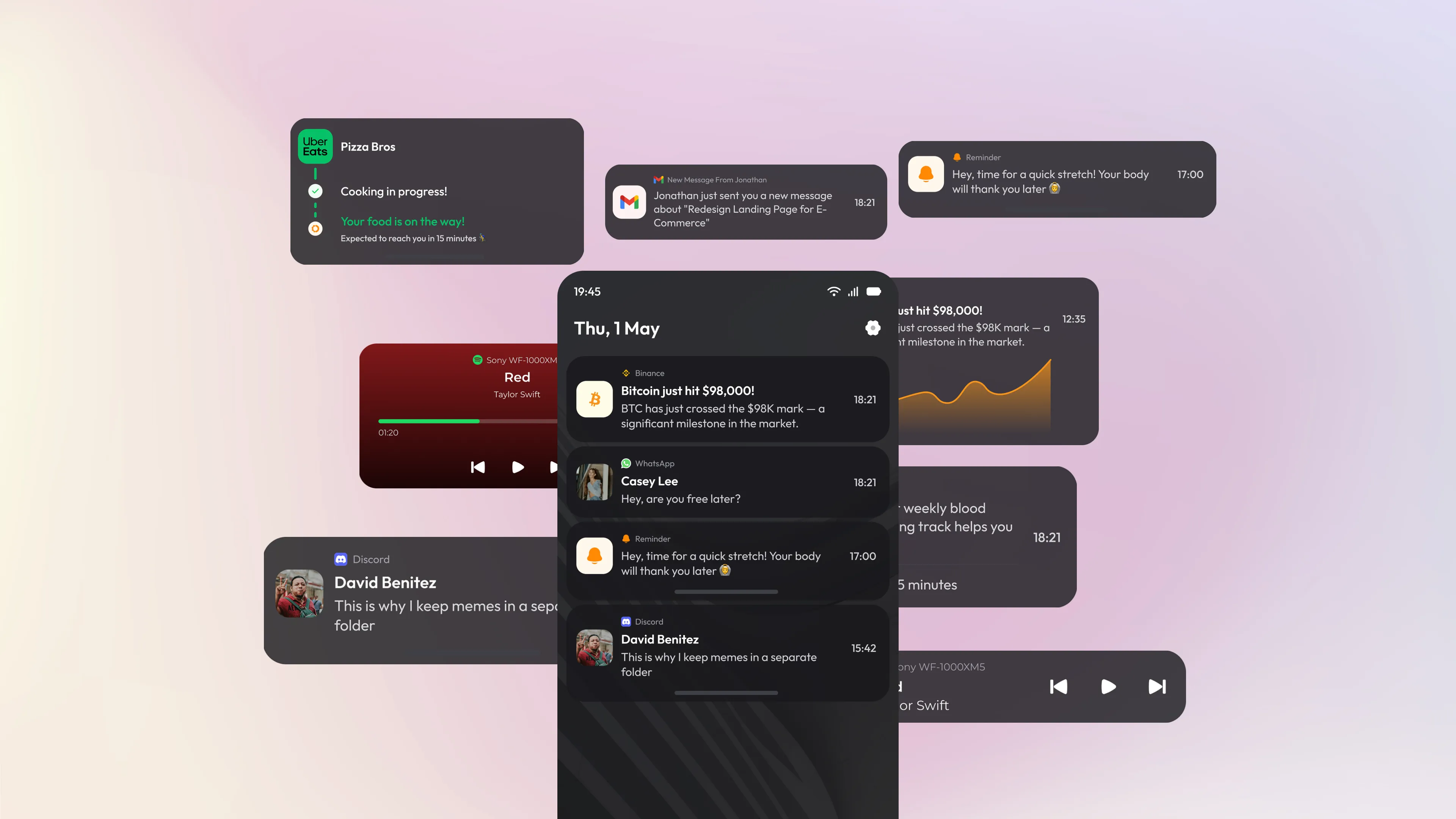
Redesigning the Mobile Notification Experience - Mockup

The bottom navigation bar is one of the most used components in any mobile app — yet small decisions in how it's designed can completely change how it feels to use. This project explores multiple visual variations of a bottom nav bar for a fintech-style app, covering icon treatment, label placement, active state styles, and the overall balance between minimalism and usability.

The Problem

Most notification UIs treat every alert the same way. A food delivery update, a crypto price alert, a WhatsApp message, and a health reminder all look identical — same size, same weight, same layout. There's no visual priority. The user has to read every single card just to understand what needs attention and what doesn't.

The Design Direction

The concept takes a dark-mode-first, card-based approach. Each notification is a contained card with enough breathing room to be read quickly. The background uses deep, warm-tinted dark surfaces rather than pure black — making the UI feel softer and more refined without sacrificing contrast. The time indicator is consistently placed on the right, keeping the scanning pattern predictable. App source labels sit above the notification title in a muted tone, so the eye naturally lands on the bold title first.

Information Hierarchy

Each notification card is structured in three layers:

01.

App identity

small icon and source label at the top, low visual weight

02.

Main content

bold title and short description, highest visual weight

03.

Metadata

timestamp on the right, muted and out of the way

Details That Matter

A few deliberate details that elevate the design beyond a standard notification mockup:

01.

Floating card depth

cards appear slightly lifted with subtle shadow and layered surfaces, creating a sense of physical depth

02.

Consistent corner radius

all cards use the same border radius, making the layout feel unified even across very different content types

03.

Muted secondary text

descriptions and metadata use a noticeably lighter text color, letting the title breathe and reducing visual noise

04.

App color accents

icons retain their original brand colors (Uber Eats green, Binance yellow, WhatsApp green) while the card itself stays neutral — a small but effective way to aid recognition

cahya putra ugira portfolio